AAhead Reader
A calm pocket library: EPUB, TXT, and CBZ on the real 480×272 screen.
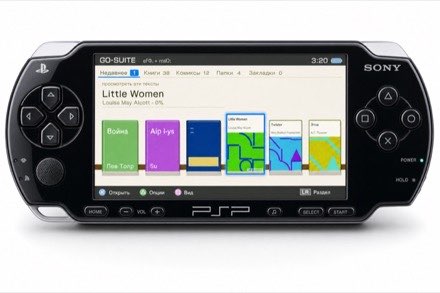
Design mockup · AAhead Reader at 480×272
| Version | recovery package in progress |
| Platforms | PSP / PSP Go — recovery and hardware acceptance pending. Other platforms — paused until V1 ships. |
| Requires | PSP build needs custom firmware (6.61 PRO-C or ARK-4). |
| Download | No recovery package published. |
| Release gate | Clean source build, version/commit manifest, checksum, and physical PSP hardware matrix. |
What it does
- Reads EPUB, TXT (UTF‑8, UTF‑16LE/BE with BOM, or CP1251), CBZ comics, and PDF in the development build.
- Uses 111 MHz while reading and temporarily raises the PSP to 333 MHz for PDF/CBZ rendering, ZIP extraction, cover decode and text pagination/reflow; all completion, failure and cancellation paths restore the reading clock.
- Stores persistent page progress for up to 128 admitted books and resumes on open.
- Caches library metadata and extracted EPUB/CBZ shelf covers.
- Three themes (Paper / Night / Contrast), adjustable font size and margins from the text quick panel or Settings.
- Bookmarks, an idle standby timer (off / 5 / 15 / 30 minutes without input), and a portrait mode for text and comics.
- Page turns: Instant, plus Slide or Curl in landscape text view.
- PDF remains required. The upstream MuPDF 1.28 development backend passes functional, hostile-input, real-document and JPEG2000/JPX QA.
- The PDF engine is not yet published: release requires either an AGPLv3-compliant Reader/source package or an Artifex commercial MuPDF license.
Controls
| D‑pad | Navigate the library and menus |
| Left / Right | Turn pages while reading |
| L / R | Turn pages while reading |
| Confirm button | Open / confirm; text quick panel; comic zoom (Cross or Circle per setting) |
| Back button | Close / back (the other of Cross or Circle) |
| Triangle (△) | Options from text, detail, or a comic; Settings from Library |
| Square (□) | Bookmark; remove a selected Marks entry; toggle Books/Comics shelf view |
| Start | Rescan while Settings is open; text quick panel while reading |
| Select | Toggle landscape / portrait while reading |
| Analog stick | Pan a zoomed comic page |
Recovery package installation
After publication, verify the recovery ZIP on a computer, unzip it, and copy its PSP folder by USB or Memory Stick to storage root. PSP browser TLS/download installation is not a verified release flow. Launch from Game > Memory Stick on a standard PSP, or Game > System Storage on a PSP Go installed to internal storage.
Known issues
- EPUB is rendered as spine‑ordered text. CSS layout, inline images, tables, and chapter/TOC navigation are not rendered.
- EPUB text and pagination are rebuilt on every open. Only library metadata and extracted EPUB/CBZ shelf covers have a persistent cache.
- EPUB and TXT text is bounded to 8 MiB per open; excess text is not loaded.
- TXT accepts strict UTF‑8, UTF‑8 with BOM, UTF‑16LE/BE with BOM, and valid CP1251 fallback. Malformed or ambiguous input fails closed.
- CBZ accepts JPEG/PNG pages in a classic single‑volume ZIP using stored or deflated entries. ZIP64, encrypted archives, GIF, and WebP are not supported.
- A CBZ/EPUB archive may contain at most 1024 entries. Each compressed and uncompressed entry is limited to 8 MiB. CBZ source images are limited to 8192 px per dimension and 32 MP, then scaled to a 512 px texture. The old approximately 2 MP full‑frame rejection no longer applies.
- DRM‑protected EPUB is not supported and will not open.
- PDF is unavailable in the recovery package until one of the documented MuPDF licensing paths is selected and packaged compliantly.
- MOBI and AZW are not supported.
Changelog
The older 0.2.0 development snapshot is not a recovery release. The next package will document its exact version, commit, payload hashes, and known limits. Full history: CHANGELOG.TXT.

Last updated 2026‑07‑28 · Valid HTML 4.01 Transitional · No JavaScript · No cookies.